Company Page: Inviting Connections to Follow
A LinkedIn company page is the foundation for your business on LinkedIn. A key part is growing followers through lead generation strategies, and LinkedIn has made it easy now!
LinkedIn has introduced a function where Admins of a business page can invite their 1st-degree connections to follow the company page. All you have to do is select who you want to invite, and they’ll receive a notification. This is some easy LinkedIn training for your business!
You simply have to:
-
- Sign in to LinkedIn, and navigate to your company page as an Admin.
- Click ‘Admin tools’ on the top right of the page, and select ‘Invite connections’ from the dropdown menu.
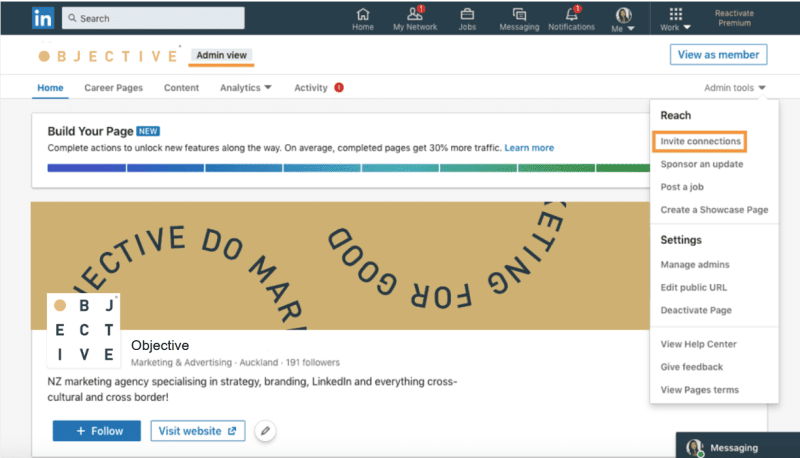
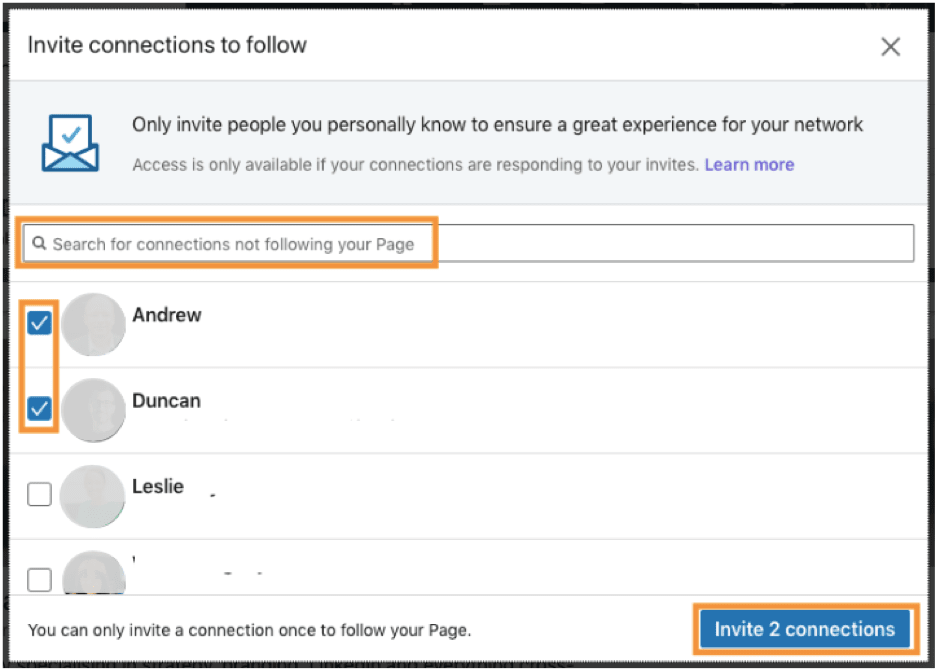
- Search and select anyone you’d like to invite (it’s best if you personally know them). Anyone who’s already following or has been invited will not be shown.
- Once you’ve selected the connections, click ‘Invite connections’. These people will receive an invitation notification.
Things to note:
- You must be an Admin of the page to use this function.
- You can only invite someone once to follow your page.
- There’s a daily limit of around 15 to 20 and a weekly limit of 100 for the number of invitations you can send, so it’s best to spread invites out.
- Invites are most effective when sent to people who are likely to be interested in your page, or if you personally know them. Avoid inviting any and every one of your connections.
- Members are able to opt out of receiving page invitations through their Network settings.
______________________________________________________________________________________
Your business could qualify for partial government grant with Marketing Minds Digital Marketing Success programme.
If you want some more personalised advice on reaching your marketing objectives, or if you have any other questions, call us at +64 9 6344 390, email hello@objective.co.nz or contact us.
Want more tips on LinkedIn for business? Check out these articles:
Want more articles relevant to digital marketing strategy? Here’s our smorgasbord:
Never miss an article! Google now lets you choose trusted websites you would like to see more often in Search. Just add Objective.co.nz as a preferred source now →
If you’ve found this article useful, please share it with others.
