How to use content suggestions in your LinkedIn Company Page
This LinkedIn tutorial for business will help you navigate LinkedIn’s latest feature on company pages. It makes it much easier to discover content that is relevant for you to post from your company page. LinkedIn’s functionality now suggests existing articles on LinkedIn that are relevant to your target audience. It also uses metrics such as engagement rate to help you decide which may be the best article to share. Learn more about this very useful functionality here:
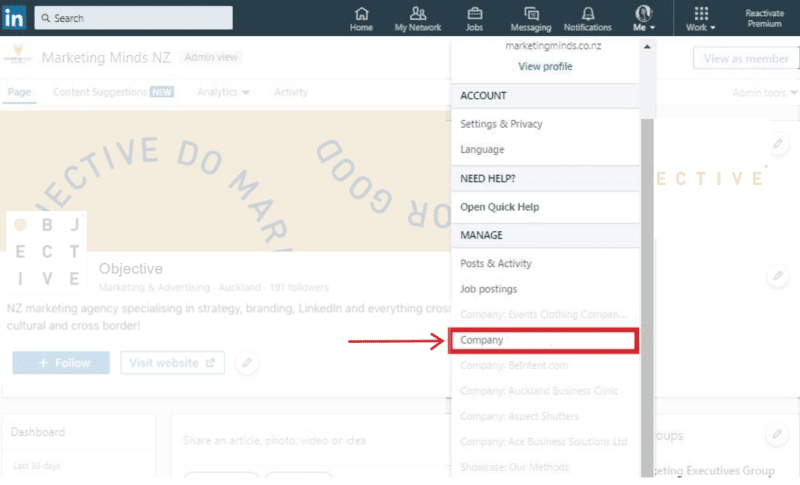
Step 1: Access your Page admin centre from the drop-down menu from the ‘me’ icon.
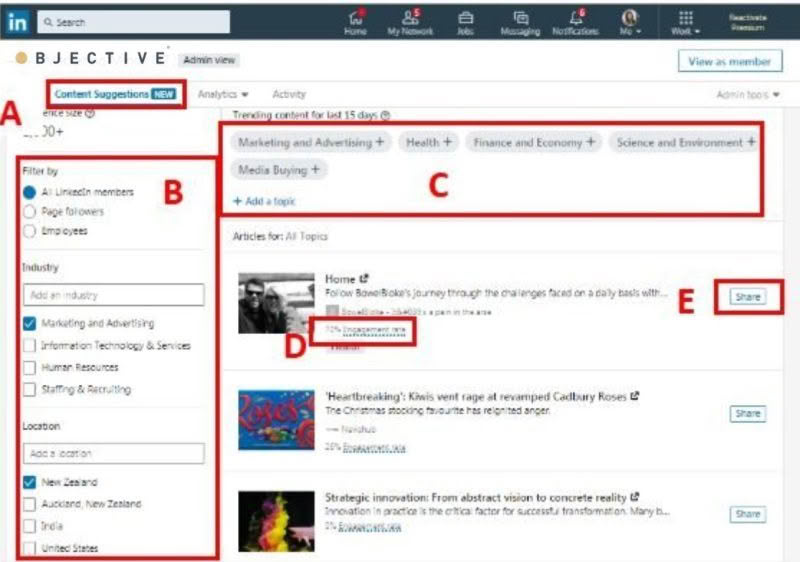
Step 2: Looking for relevant content of an article.
A) Click the Content Suggestions tab in the top navigation bar.
B) Filter the content on the left navigation by audience, industry, location, job function or seniority. (Note: at least one filter must be selected).
C) LinkedIn has selected a few trending content topics here. However, you may edit to add or delete topics that you want more information on. (Tip: if your focus is New Zealand, you may want to add this in as a topic)
D) Refer to the engagement rate to evaluate which article you would like to share. It is a good indicator to see which article has performed well so far.
E) Click Share to create your company post and share when you’re done! (Note: It is advisable to insert your own commentary in the comment rather than just sharing the link. It is an opportunity to show what your company’s thoughts and opinions are)
Finally, this is also a good tool to use to search for personal profile sharing. It is easy enough to conduct a search here for the right article and copy the link to share from your own profile.
______________________________________________________________________________________
Your business could qualify for partial government grant with Marketing Minds Digital Marketing Success programme.
If you want some more personalised advice on reaching your marketing objectives, or if you have any other questions, call us at +64 9 6344 390, email hello@objective.co.nz or contact us.
Want more tips on LinkedIn for business? Check out these articles:
Want more articles relevant to digital marketing strategy? Here’s our smorgasbord:
- Nine Reasons to Hire a Marketing Agency
- How to Choose the Right Social Media Platforms
- How to Nail Your Email Marketing Strategy for Better Results
Never miss an article! Google now lets you choose trusted websites you would like to see more often in Search. Just add Objective.co.nz as a preferred source now →
If you’ve found this article useful, please share it with others.
